Building an RTMP server from scratch in Go
Andrew Song / October 1, 2026
Why
Throughout my whole career, everything I’ve worked on was built on REST and HTTP. While building out these applications, I’ve always wondered how do you stream stuff? With REST you can “ping” information back and forth, but sending or uploading a continuous stream of information wasn’t possible. I heard and read a little bit about RTMP, but that was just surface level stuff. I also wanted to learn Golang. I heard from someone that building an HTTP server from scratch was a good way to get familiar with a new language so I figured this project would be the perfect “2 birds 1 stone” solution. Get some hands-on experience with Golang and learn how a streaming protocol works.
Ground Rules
I initially started thinking about doing this project the old-fashioned way. Watch some Golang fundamentals videos on YouTube, sign up for a Udemy course and complete 30% of it, and scour through documentation, but we’re in 2026 now. Let’s use AI. So that’s what I did—with a big constraint of course. The purpose of this project was to learn how a live streaming protocol works from the ground up and also get experience with a new programming language. To do this, typing and getting those finger muscles moving would be the way. The way I would use AI would be as a guide, a teacher, a tutor. Someone Something that would guide me when I get stuck, teach me fundamentals and essentially help me overcome roadblocks. So to do this, I put another constraint on myself. No direct AI plugin in my code editor. No GitHub Copilot and no Claude Code in my VSCode. I would only use Google’s web AI search and the Claude web app.
What is RTMP and an RTMP Server?
RTMP stands for Real-Time Messaging Protocol and it is a protocol or a communication method for livestreaming information. It was built in the early 2000s at Macromedia, which Adobe later acquired. There are other protocols out there for livestreaming media each with their own pros and cons, but RTMP is one of the main protocols widely used today. I wanted to build a server that uses RTMP so that it can read and process a live video stream from a client. If you wanted to broadcast something live, you could send your live feed to my server using RTMP and my server can read your audio and video data. For this project, my goal was to successfully broadcast from OBS (Open Broadcaster Software) to my server. High level overview of how a RTMP stream works.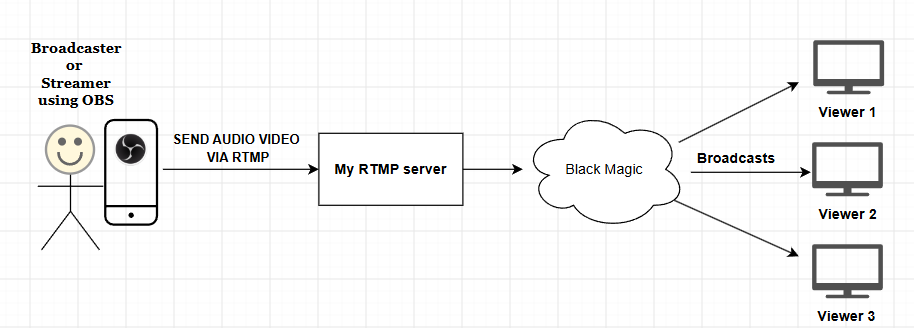
Let’s get down to the nitty gritty
My major inspiration for this project came from a talk on YouTube from a developer named Nick Chadwick. In that talk, he goes into the weeds of what RTMP is and how it works.
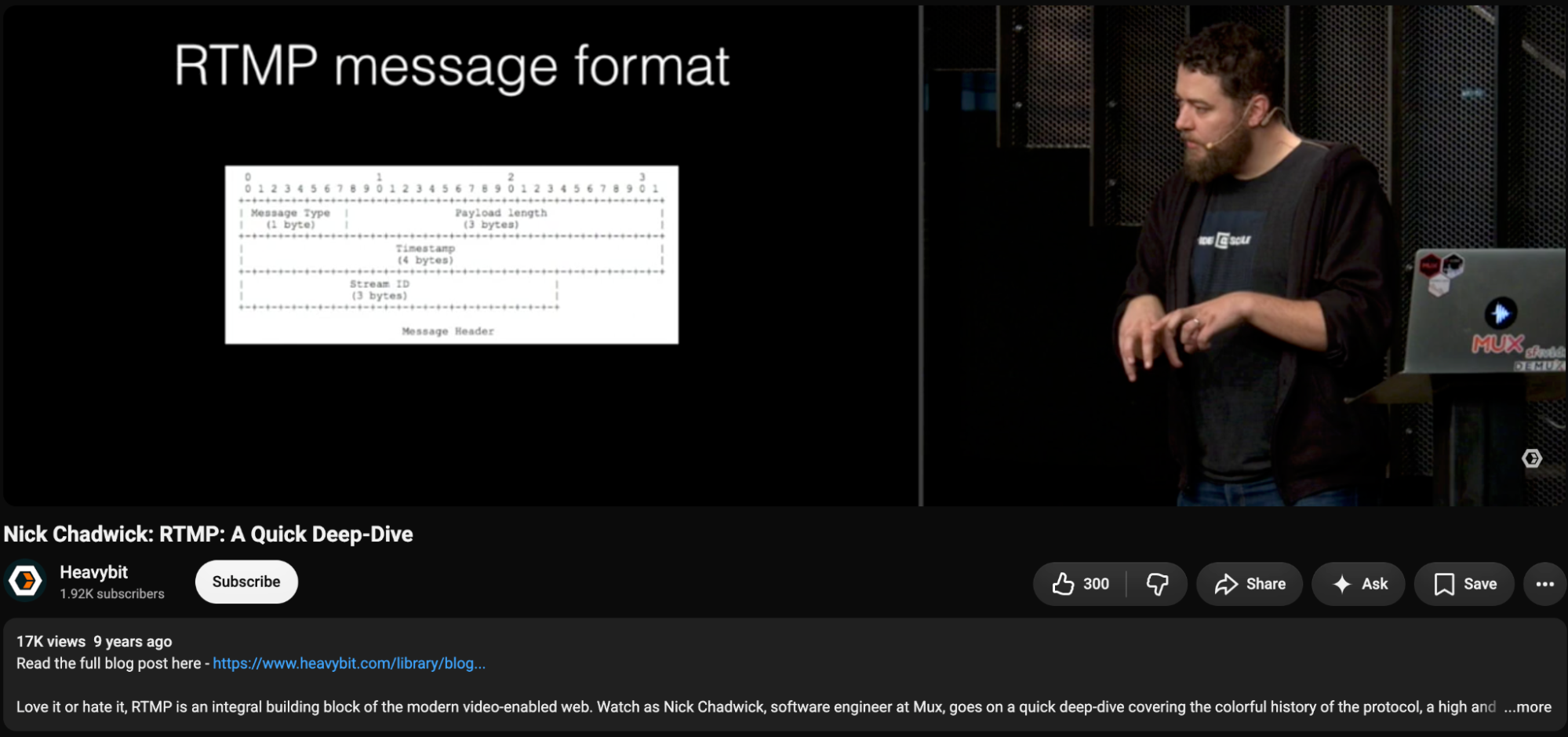
Nick Chadwick’s talk on RTMP. This dude knows a lot.
RTMP uses TCP, so in my code I opened up a TCP connection that would listen on port 8080. Boom, connection established. This connection is what would stay persistently connected between the client and server and this pipe is where bytes of data would pass back and forth. I knew initially there had to be some kind of handshake process. Every form of digital connection has at least some kind of handshake process…right? Luckily early on during this project I found the official documentation on GitHub aka the spec for RTMP. This had everything. What the communication expectations were between client and server, what every bit and byte meant and how sending 1s and 0s could translate into audio and video data. This was the Rosetta Stone. With Nick’s talk and this spec, I took my first big boy steps and began decoding bytes of data. Setting up OBS to point to my server using the url rtmp://localhost:8080 then printing out the bytes my server was receiving was pretty cool to see.
Typing rtmp:// felt pretty badass. My first glimpse of raw bytes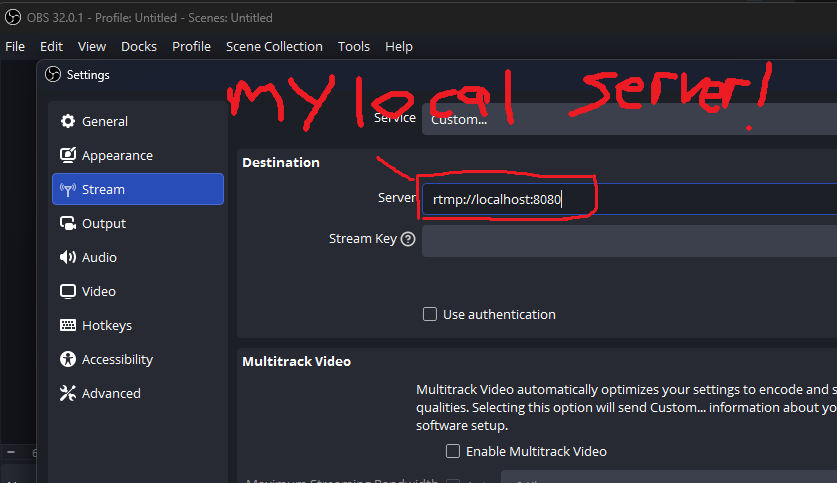
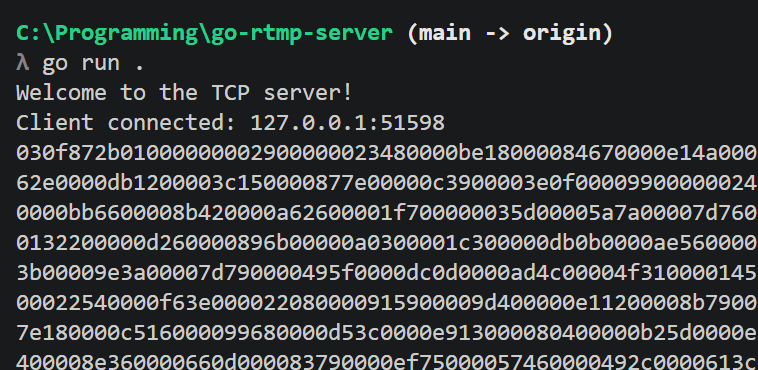
After a couple of evenings working on this, I started learning how to decode bytes and read the documentation, but eventually I hit my first major roadblock.
Shake my hand please!!!
The RTMP handshake consists of a couple roundtrips back and forth between the client and server. This consists of the client and server agreeing on the RTMP version, some random data and then finally acknowledging each other. Once this handshake completes, you can begin the stream. Kinda like a shakedown, then an “Alright you’re good. Let them in.” The problem I ran into was the order of operations this happens in.
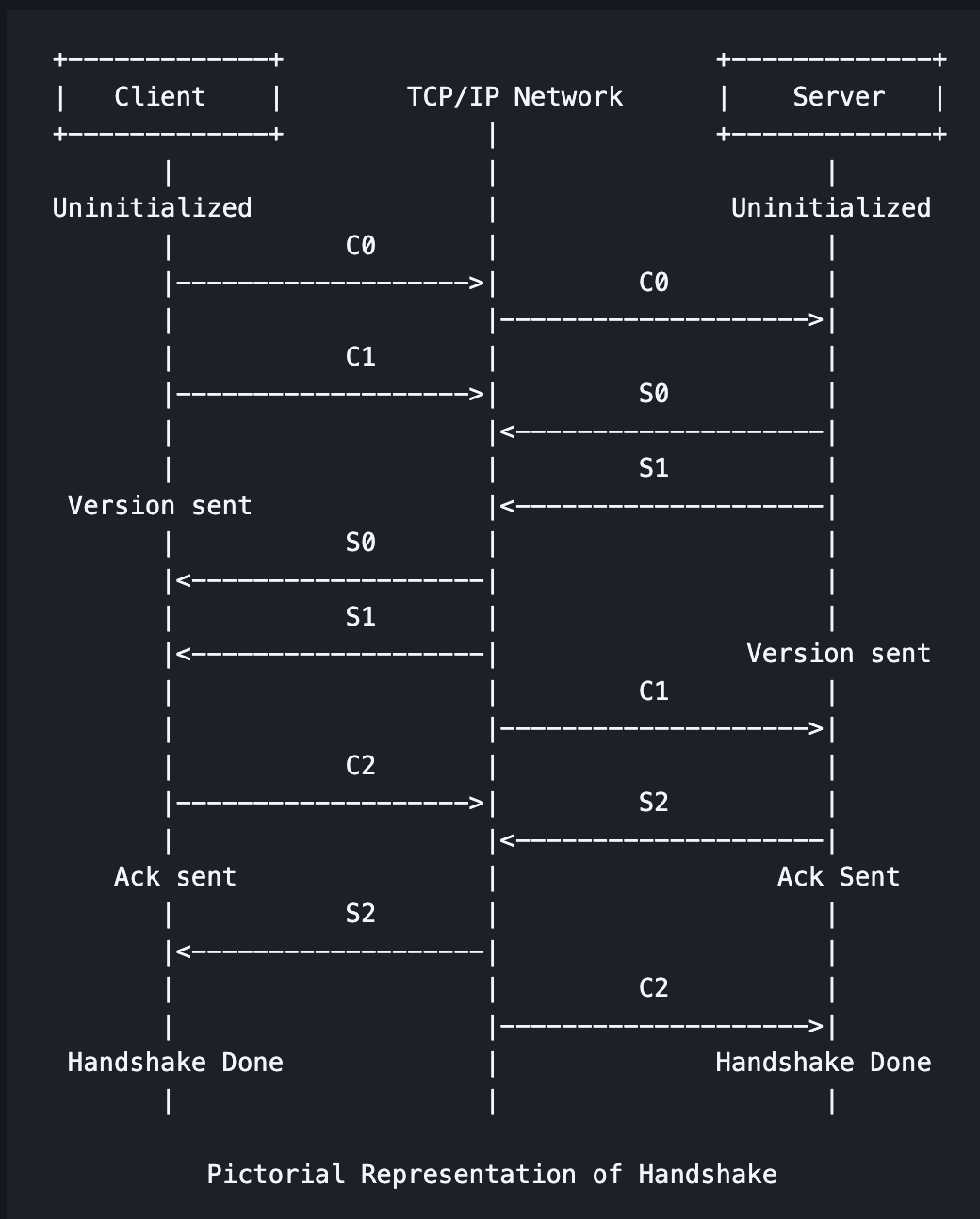
The handshake diagram from the RTMP spec. Gamefaqs walkthrough ASCII
Here’s how I read it, where C means client and S means server:
- Receive C0 and C1
- Send S0 and S1
- Receive C2
- Send S2
- Handshake complete
So I followed the documentation and coded up the logic.
I got C0 and C1, I sent back S0 and S1, but then nothing….sat there waiting….I never got a C2.
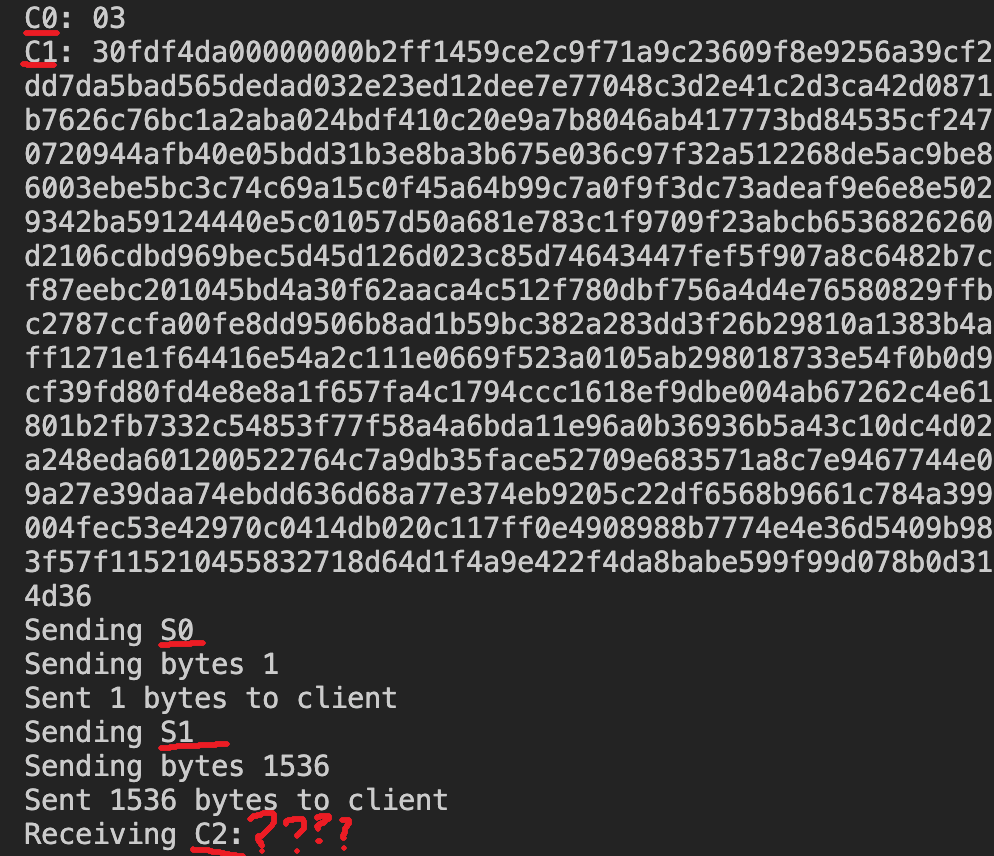
alo? nothing back for C2
This is where I would turn to my buddy Claude. I pasted my code into Claude and asked it to help me debug and after some digging and trying some things that didn’t make sense, it would say “yep that’s it, that’s the problem” and confidently give me another non working solution. I asked for its sources and it would give me urls that would give 404s or just domains that didn’t exist. So I had to keep digging.
Next I turned to FFmpeg. If you don’t know what FFmpeg is, you do now. When it comes to audio and video it can do EVERYTHING. Read the wiki on it if you haven’t. I tried using FFmpeg as an RTMP client and had the same error. Radio silence after I sent S1. No C2. Since it’s open source, I downloaded the FFmpeg source code, scoured through and found their RTMP client code. I was trying to figure out how do they do the handshake process? Are they sending different bytes from what I was reading? Are they expecting different bytes? Why isn’t my code working with OBS?
Once I found FFmpeg’s handshake code I found the problem. FFmpeg is sending C0 C1 and then reading for S0 and S1 but THEN it’s also waiting for S2. Once I sent S2 from my server, I got the C2 I needed and the floodgates opened up to the next step of the protocol. Lesson learned. I was reading the diagram wrong: I followed the client’s side, but on the server’s side S2 goes out before C2 comes in. (-_-)*
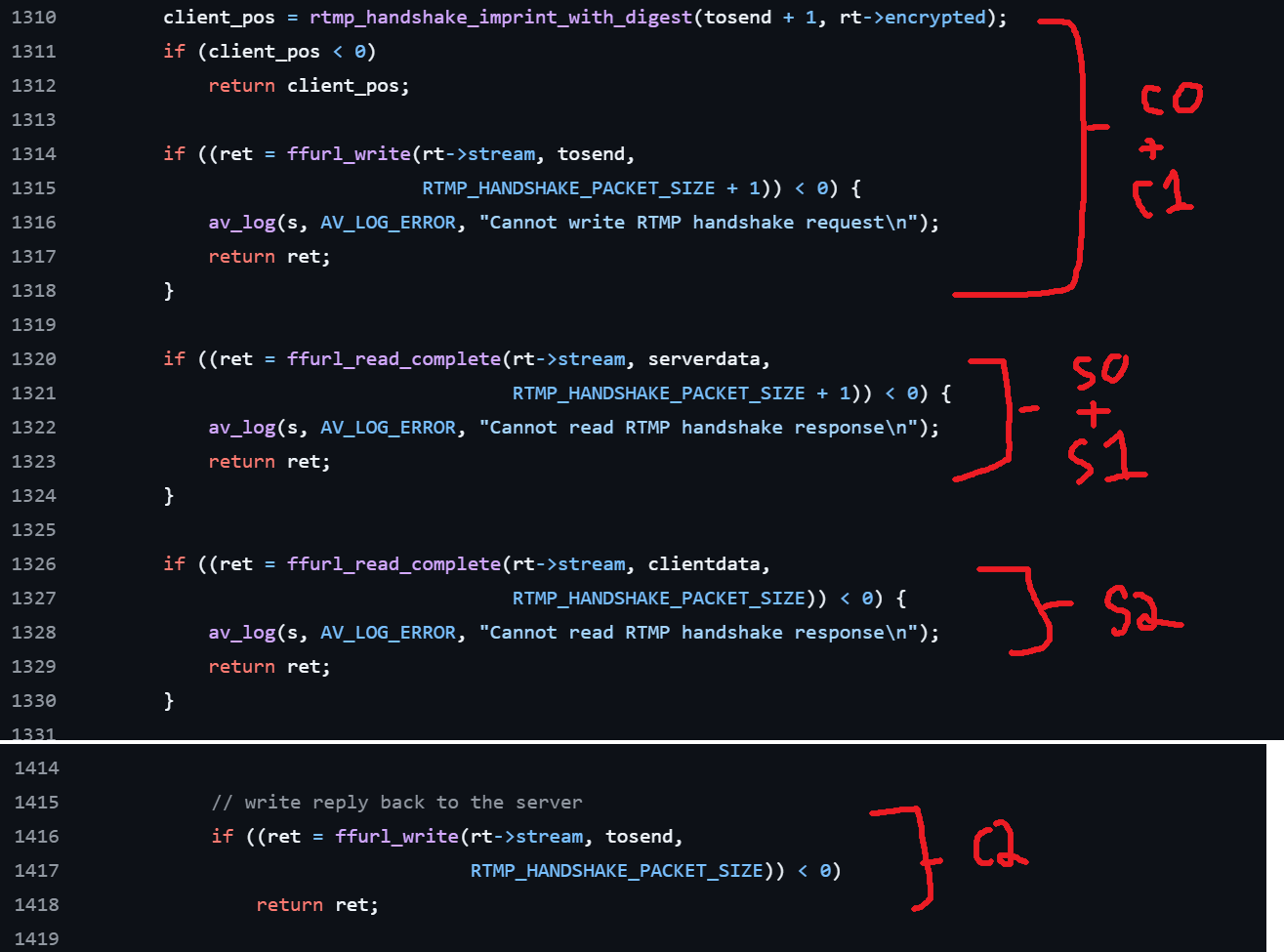
FFmpeg’s code. Notice the line numbers and order of operations.
Double CHUNK Chocolate Feature
The next step of this protocol is where a majority of the meat and potatoes live. Where the communication begins and all the audio and video begins to get transferred. The way RTMP sends data is through a data format they call chunks. If you’re trying to reverse engineer this, this gets confusing very fast because the word header is thrown everywhere in the spec.
So each chunk consists of a Chunk Header and the actual data itself.
The Chunk Header consists of a Basic Header, Message Header and a timestamp.
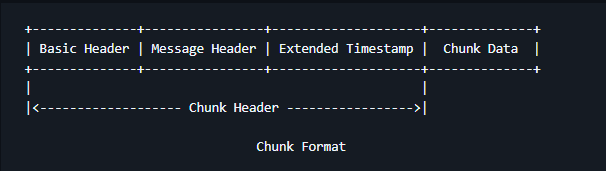
chunky
The basic header and message header each have their own types with each type corresponding to how many and how to interpret the following bytes.
The basic header holds the format type (2 bits, so 4 options) along with the chunk stream id. The chunk stream id can be 65k different numbers. From my vast experience of working on this protocol for 1 month, each unique stream id can be a different channel e.g. chunk stream id 1 = commands: pause, play. chunk stream id 10 = audio data. chunk stream id 11 = video data, etc. The format type in this basic header determines how the message header is constructed.
The message header would optionally consist of timestamp, the message length (how many bytes to parse), another stream id, and a message type. These different types supposedly exist to reduce the amount of data that is being streamed over. For example, when sending audio and video data the most common chunk type that is sent is type 2. Type 2’s header consists of only the timestamp and expects the server to work off of previous chunks to determine the stream ids and message lengths. After some trial and error and some finagling I was able to parse my first RTMP chunk and I was seeing something that was starting to make sense—a control message.
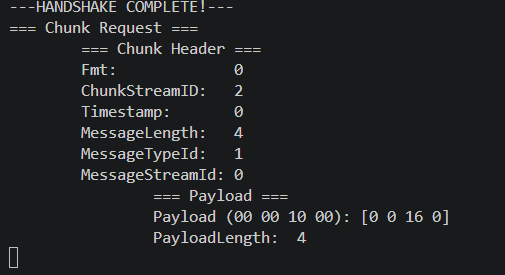
My first cleanly parsed chunk. 5 big booms.
Controls and Commands
Besides data being sent back and forth between the client and server, there are some configurations and controls being communicated. After cleanly parsing my first chunk I was seeing my first Control Message. A Control Message is like a configuration the client and server both agree to. Depending on the message type id (1 through 6) you can decipher what control message was being sent. What I was seeing was the “Set Chunk Size” control message—message type id 1. This lets the server know what the max size of each chunk payload is going to be going forward and OBS was sending a value of 4096. Cool. I’ll store this value and use it to help parse chunks.
While reading the documentation, I saw that there are other hardcoded values for message type ids called messages. Seemed pretty straightforward, I’ll just continue to expand my switch statement to handle all these cases. This quickly led me down another rabbit hole of detangling and discovery.
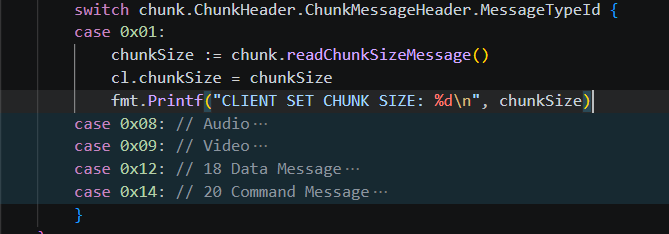
Handling all the message type ids. Haven’t run into 2-6..yet
Relics
So far, RTMP has done a handshake and established some preliminary stream configurations all with just interpreting bytes and correlating that with a dictionary of interpretations. Now we’re about to evolve from rudimentary caveman talk by using more complex data types and strings.
What I was seeing was a message type id of 20. This meant 2 things. This chunk is going to be a Command Message and that the payload will be in some format called Action Message Format 0 (AMF0). AMF0 is a serialization protocol created by Adobe during the Flash days to send messages between a client and remote service. From the technical side of things, it’s pretty straightforward. The closest modern equivalent is JSON. Data can be represented via just value or key:value and it supports almost every standard datatype. Numbers, booleans, strings, arrays and objects. So following the Wikipedia documentation, I began to slowly unravel the raw bytes from the RTMP command and lo and behold I saw my first string representation of communication! It was the connect command.
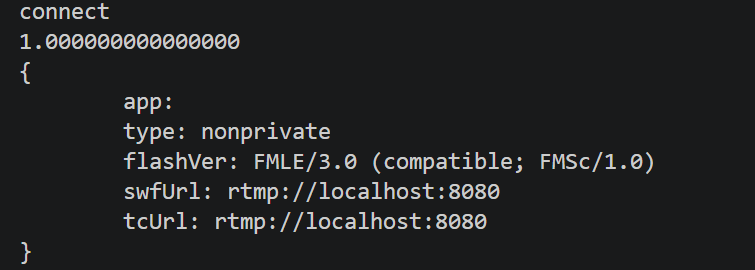
It even has brackets like JSON!
This was so cool to see. Not only was I able to interpret this protocol from 20 years ago, but I’m actually starting to see some artifacts left over like the Flash version! Wait. Why does the client even send that?
At this point, I’ve laid down a lot of the foundational code needed to decode chunks and the pace was beginning to pick up. Continuing to follow the spec, there were more commands that the client and server needed to send back and forth. While decoding all this I saw my first glimpse of what this protocol was used for: media information.
We’re getting there
The first bit of anything media related that I saw was a data message with the header @setDataFrame. This was from the client and it had a body with metadata of the video it was sending.
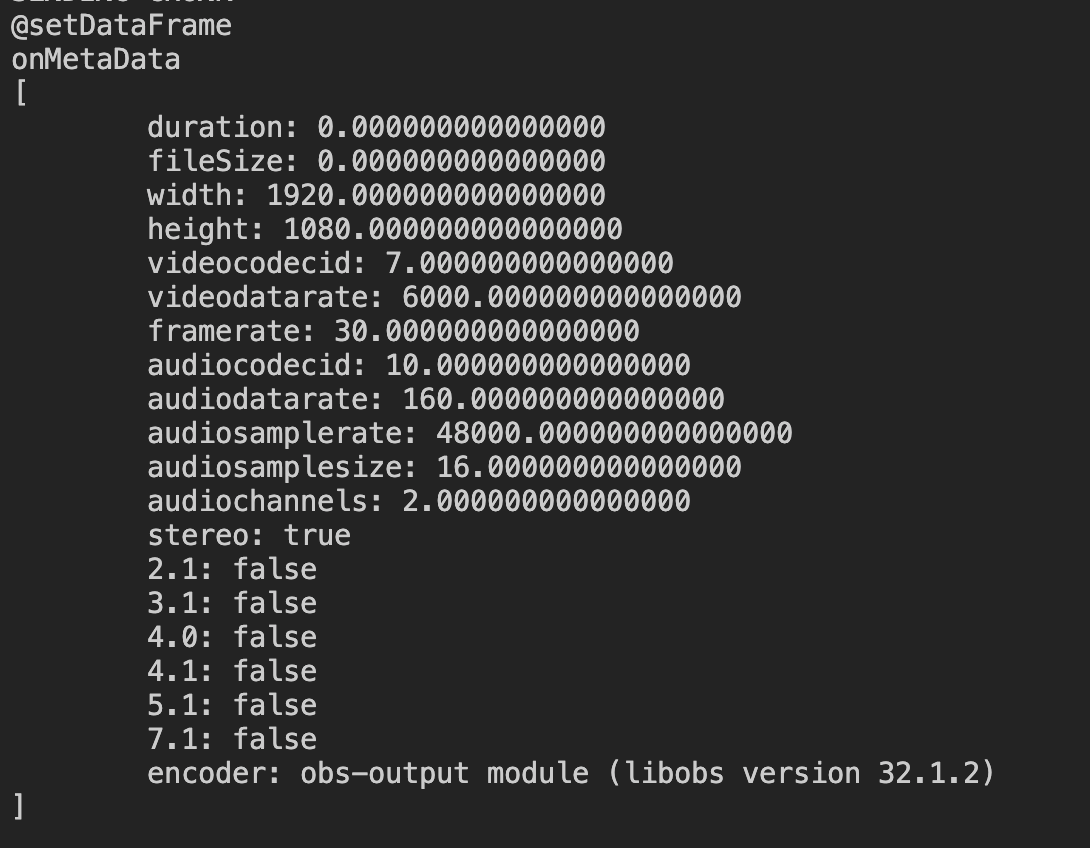
Every number in AMF0 is a float64. Hence the trailing 0s
A couple of days earlier, I put a TODO in my message type id switch statement for values 8 & 9 because the spec said that would be for audio and video data. While handling all these commands I kept scrolling past that TODO and wondered if I would ever run into that. Eventually, after parsing 5 more RTMP commands I finally saw my first message type id of 8.
Game time
Here we go. We’re in the thick of it. Got past the handshake, cleanly parsing chunks, and past all the init commands. We’re finally seeing raw video and audio data. I immediately ran into another interesting leftover artifact. The media data is formatted into packets in the Flash Video (FLV) format. The FLV format is a container around the actual raw video and audio data. The FLV container states what kind of information it holds (audio vs video), timestamp information, and the codec of the audio and video data. By this point, I’ve become used to finding and reading specs so I was able to pretty quickly decode and code up the FLV format. Once I had this coded up, my server was fully working and I had a working prototype. The chunks were flowing cleanly, I was seeing demuxing in real time on my console output. There were still error cases I needed to handle, but this is a working RTMP server.
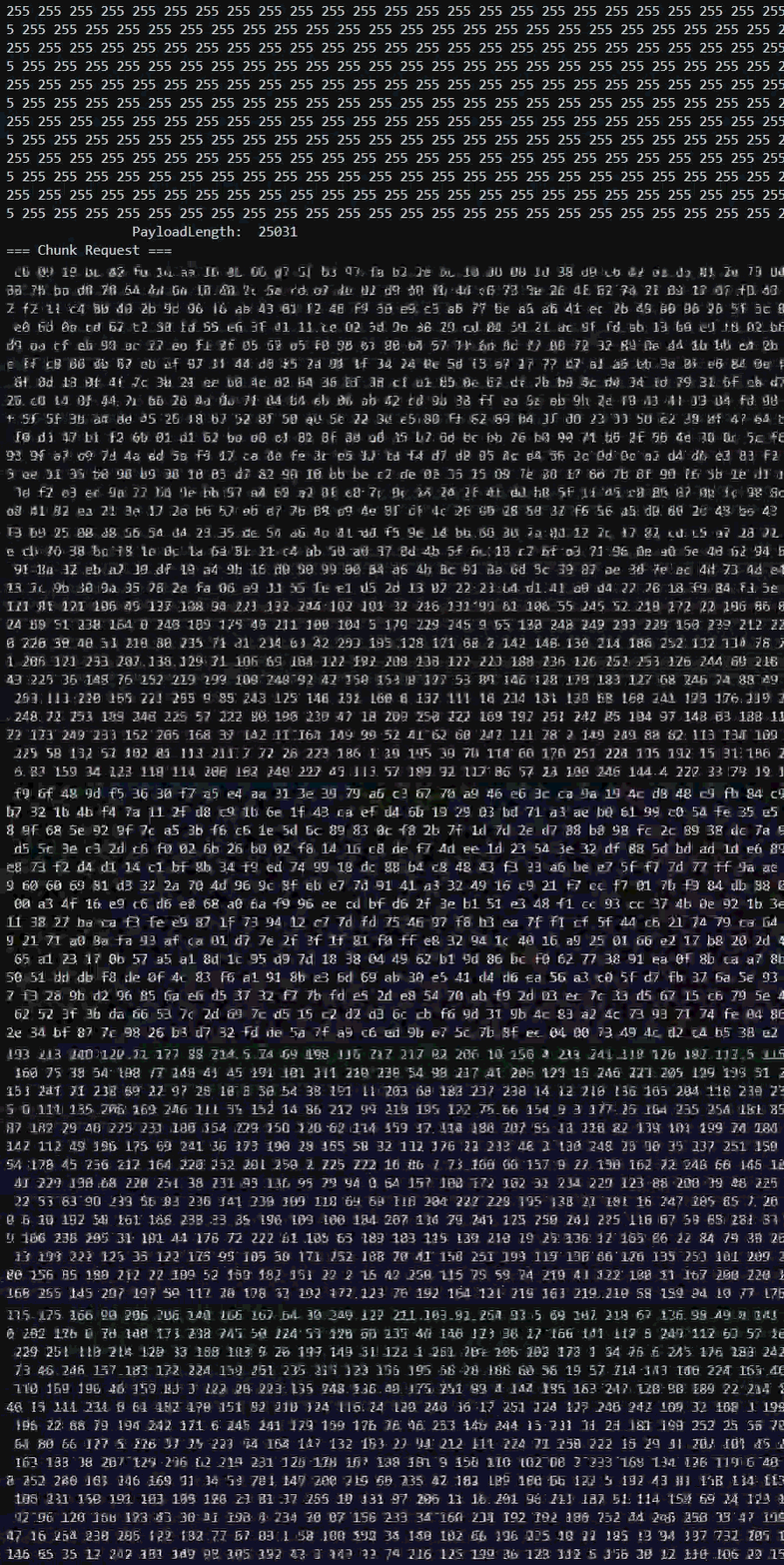
The raw audio and video bytes outputting to console. So much data.
Loosening the reins
The next thing I did was something my therapist would’ve disagreed with. I moved the goalposts further. I made a new goal to save an actual video that I could play back. Little ole naive me thought: I’ve made so much progress at this point, how hard can it be? The first thing I tried was to write the raw audio and video bytes to a .flv file in the order I received them. When I played it back in VLC I got something, but it was a corrupted mess.
My first video looked like this.
For the next few evenings I dipped my toes into the technical depths of how video compression worked. I picked up a surface-level understanding of codecs, I-frames, P-frames and B-frames, but quickly learned video compression is a whole other beast. After three nights of digging, I was desperate for some kind of output, so I let Claude run wild: I gave it my code and had it try different things. The first videos were unrecognizable blobs of compressed pixels. Then they became recognizable, but the video and audio were desynced, the video was playing too fast and the timestamp / seekbar was off.
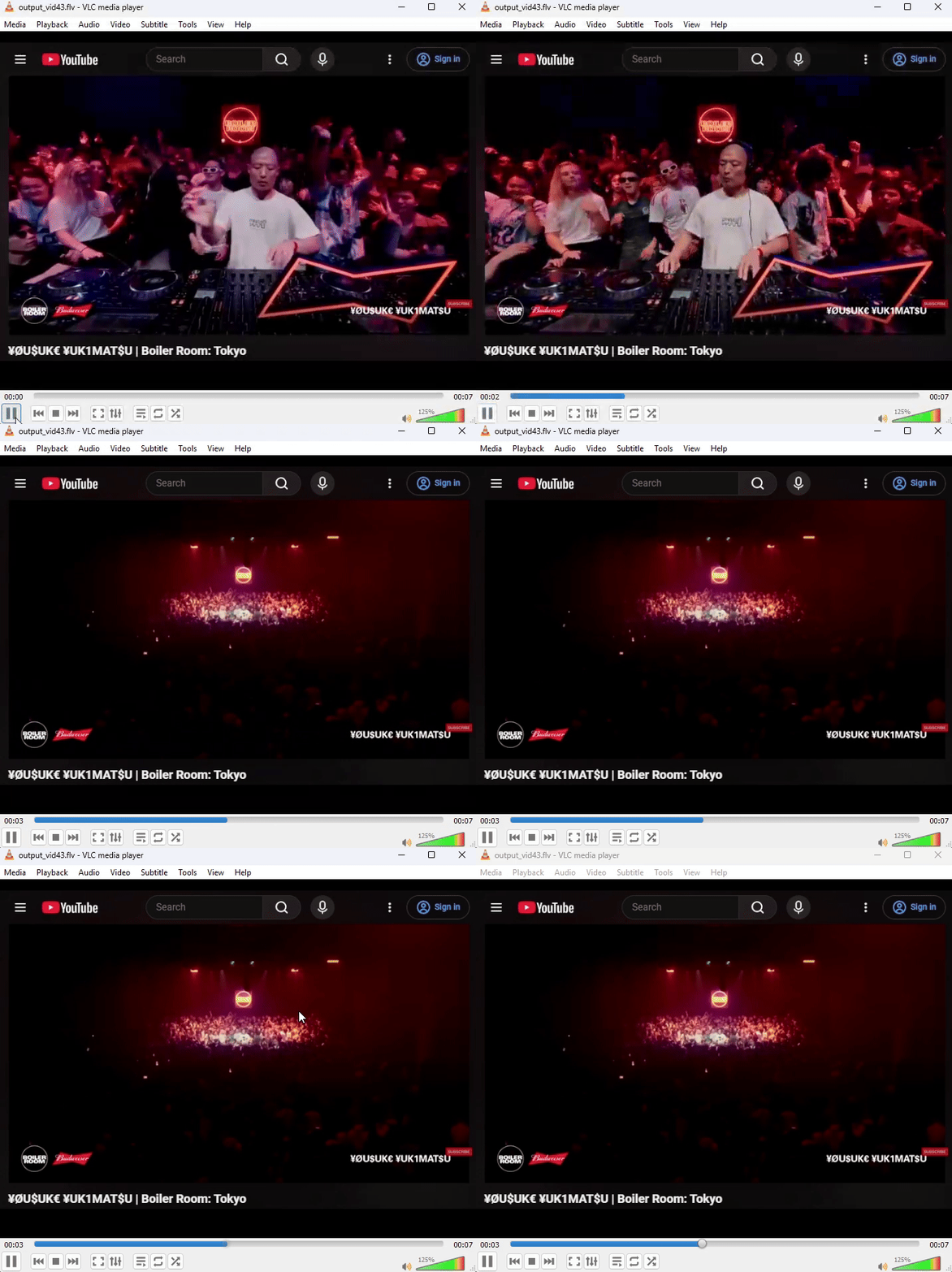
Livestreamed my browser playing a YouTube video. Saved video is playing back too fast. Audio is desynced. Video timestamp should be 10 seconds and the seekbar just freezes.
I would livestream 10-second videos to test my server, but VLC would show inconsistent lengths and the seekbar would stay stuck even though the video played. I learned that FLV files store metadata at the beginning of the file, including the video duration, and that’s what VLC uses for the seekbar. The problem is a livestream gets written in a linear fashion as the data comes in, so when I’m writing the start of the file I have no idea how long the video will be. To fix this, while writing the file I save the byte position of where the duration lives. While the stream is ongoing I have a counter counting up, and when the stream ends I go back and write the final duration to that saved position as a float64. Voila! VLC’s video duration and seekbar are fixed.
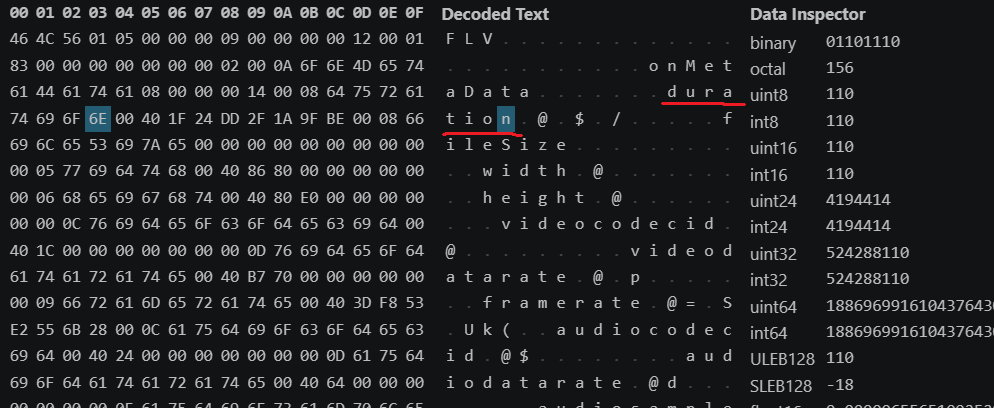
Hex Dumped FLV file.
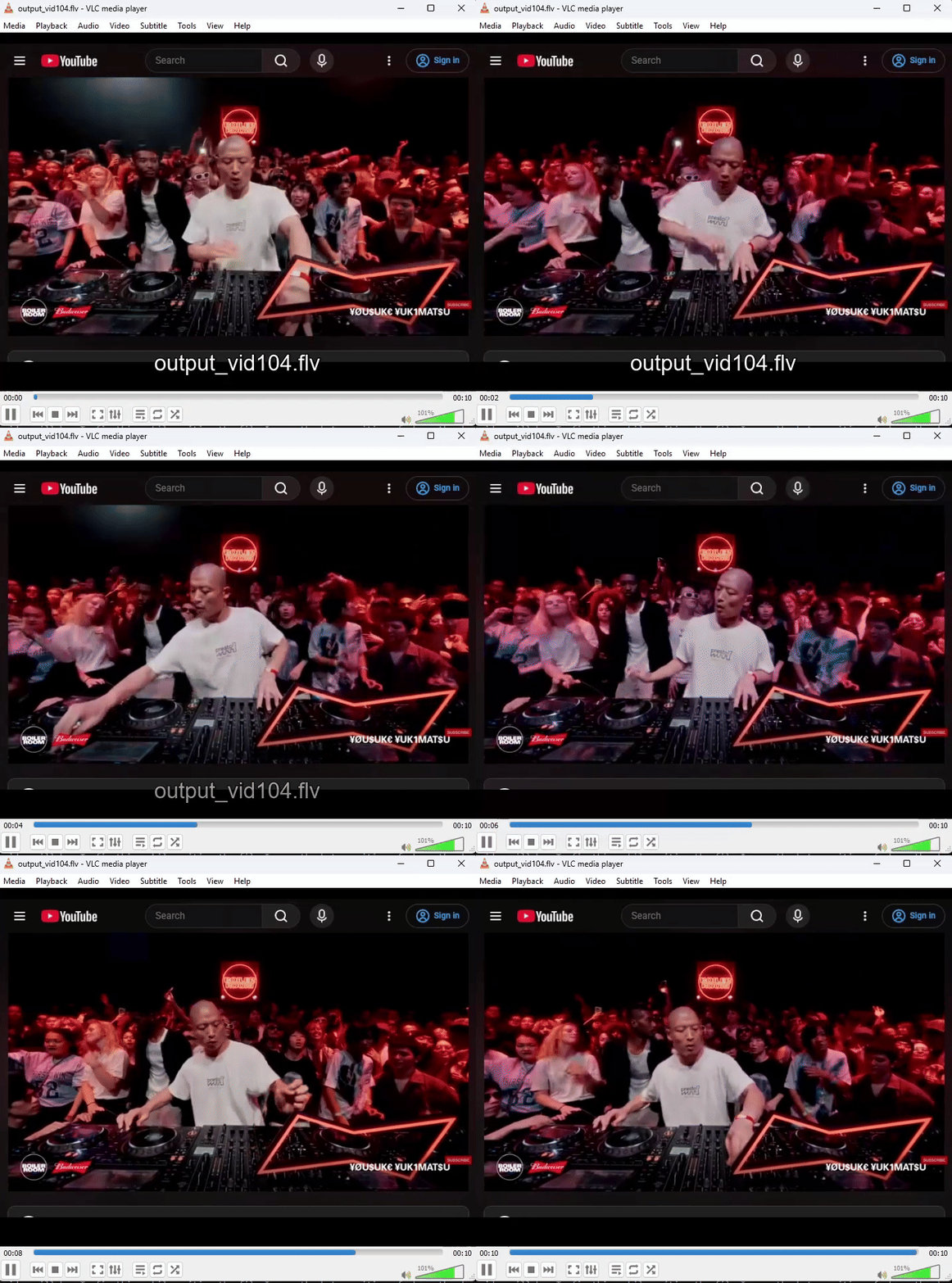
With Claude magic and fixing the timestamp issue, video plays back as expected!
Conclusion
Building out an RTMP server in Golang was one of the most interesting technical deep-dives I’ve taken in my career. Most of the media I consume nowadays is livestreamed content, whether it’s Twitch, YouTube, or some live sport. While watching this I’ve always wondered how it works. This project has really scratched that itch. This is just one component of the whole digital livestreaming process and the fact that 2K quality videos can be ingested and distributed to potentially millions of people in under 5 seconds is mind-blowing. There’s still a lot I’m curious about and would like to add onto this project, like bitrate configurations, limited bandwidth, unstable network connections, downstream transcoding, pipelining and distribution.
Sticking to my self-imposed constraints early on forced me to get my hands dirty. It gave me firsthand experience of where AI excels as a tutor and falls short as a developer. One technique I’ve learned is to ask for reasoning and sources. I once heard someone compare LLMs to parrots: a parrot doesn’t really know what it’s saying, it’s just making sounds. Treat an LLM the same way. Asking it to show its work lets you check whether you’re making the right choices, and whether its answers come from reliable—or in my case, existing—sources.
I got my feet wet in a whole new realm of engineering when it comes to livestreaming technology, networking and video processing. I brushed up on some bit math I haven’t used since college. I learned that the core mechanism of this protocol is maintaining a persistent TCP connection. I read up on the fundamentals of video compression. Beyond this project, I learned about another initiative and how a group of engineers are inventing a new streaming protocol called Media over QUIC, built on QUIC and UDP rather than TCP.
I also picked up the fundamental syntax and capabilities of Go along the way. It strikes a good balance: its standards are strictly enforced (especially by the compiler), yet it stays concise and offers the precision of a low-level language. It’s not as verbose as Java or as abstract as Python, and its strong typing keeps it from being as cryptic as C. I’ve only scratched the surface of concurrency by allowing multiple clients to stream at once, but starting up a goroutine (Go’s lightweight thread) is literally just adding the word go in front of your function call. So simple.
Through this project, I’ve proven to myself there’s still joy to be had in programming. The workflow has changed, but the learning, reverse engineering, problem solving, discovery and, most importantly, the satisfaction of seeing your code work are still there.
Resources
- GitHub repo - the code for this project
- RTMP: A Quick Deep-Dive - Nick Chadwick’s talk
- RTMP specification - the spec I worked from
- Another RTMP Spec - Another spec reference
- FFmpeg’s RTMP implementation - where I found the handshake order
- Action Message Format - Wikipedia’s breakdown of AMF0
- Flash Video - Wikipedia’s breakdown of the FLV container
- FLV Spec - FLV Spec
- OBS Studio - the client I streamed from